 deffinru
58ae4fb8af
Инсталлятор по программе PM11, руководство оператора
deffinru
58ae4fb8af
Инсталлятор по программе PM11, руководство оператора
|
2 settimane fa | |
|---|---|---|
| .. | ||
| readme.md | 2 settimane fa | |
readme.md
Word Document Processing for .NET

Product Page | Support | Documentation | Getting Started
About Xceed DocX
Xceed DocX is a .NET library that allows C#, F#, and VB.NET developers to manipulate Microsoft Word files in an easy and intuitive manner. Xceed DocX is fast, lightweight, and self-sufficient without dependencies on third-party software such as Microsoft Word or Office suites.
Functionalities
- Manipulate Word documents with an easy and intuitive API created for developers. It does not use COM libraries, nor does it require Microsoft Office to be installed.
- Create or modify Microsoft Word documents programmatically with the main Microsoft Office Word elements, such as formatting and styling.
- Work with important Microsoft Word features like pictures, sections, headers and footers, charts, lists, hyperlinks, and tables, to name a few.
- Perform actions on your documents, such as joining documents together, adding page numbering, applying a template, or performing search and replace operations.
- Use DocX on .NET 5+ apps and create company reports, invoices, or mail merge documents.
License Information
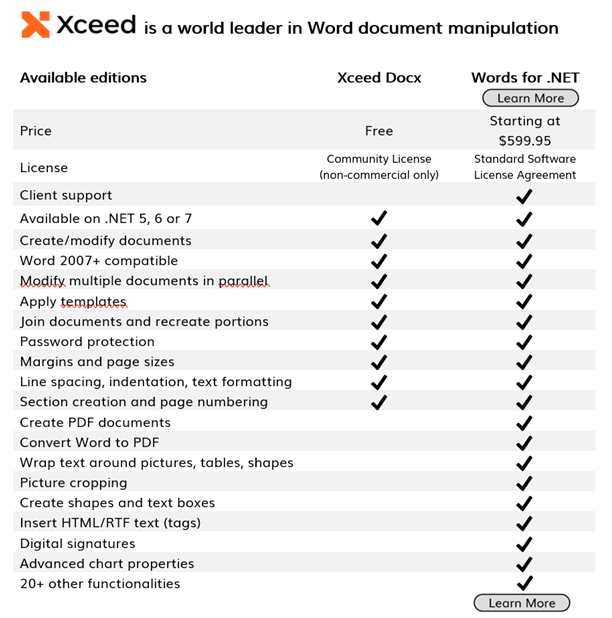
Xceed DocX for .NET is for open source and non-commercial use only, and it is provided under the Xceed Software, Inc. Community License.
Are you creating a commercial application? You may want to consider Xceed Words for .NET, which provides additional functionalities, enterprise support, and regular updates.
Getting Started
Let's jump right in! To get started, you will first need to set the LicenseKey property, which will unlock the product. Looking for your trial key? You will find it in "C:\Xceed Trial Keys". We safely put them there after you installed the product from NuGet.
// Create a new document
DocX document = DocX.Create("SampleDocument.docx");

// Add a title to the document
document.InsertParagraph("Sample Document Title").FontSize(18).Bold().Alignment = Alignment.center;

// Add a paragraph with some text
document.InsertParagraph("This is a sample paragraph.").FontSize(12).Alignment = Alignment.left;

// Add a table with some data
Table table = document.AddTable(3, 2);
table.Design = TableDesign.ColorfulList;
table.Alignment = Alignment.center;
table.AutoFit = AutoFit.Contents;

// Add headers to the table
table.Rows[0].Cells[0].Paragraphs[0].Append("Name").Bold();
table.Rows[0].Cells[1].Paragraphs[0].Append("Age").Bold();

// Add data to the table
table.Rows[1].Cells[0].Paragraphs[0].Append("John Doe");
table.Rows[1].Cells[1].Paragraphs[0].Append("30");
table.Rows[2].Cells[0].Paragraphs[0].Append("Jane Smith");
table.Rows[2].Cells[1].Paragraphs[0].Append("25");

document.InsertTable(table);

// Save the document
document.Save();
About Xceed Words for .NET